- The GitHub CLI APT repository signing key was rotated. The old key expired on 2026-09-05
- Your local keyring still holds only the old key, so
apt updaterefuses theghrepository - Replace the
ghkeyring, in the path your source entry actually points at, then update the index and upgradegh - Only APT and RPM installs are affected: a
ghinstalled through Homebrew, a binary from GitHub Releases, or a source build never touches this keyring and needs no action.
$ gh --version
gh version 2.100.0 (2026-09-03)
https://github.com/cli/cli/releases/tag/v2.100.0
🔎 Problem
Suppose that apt update starts complaining about the GitHub CLI repository, while every other repository updates fine:
$ sudo apt update
...
W: An error occurred during the signature verification. The repository is not updated and the previous index files will be used. GPG error: https://cli.github.com/packages stable InRelease: The following signatures were invalid: EXPKEYSIG 23F3D4EA75716059 GitHub CLI <opensource+cli@github.com> The following signatures couldn't be verified because the public key is not available: NO_PUBKEY 5612B36462313325
W: Failed to fetch https://cli.github.com/packages/dists/stable/InRelease  The following signatures were invalid: EXPKEYSIG 23F3D4EA75716059 GitHub CLI <opensource+cli@github.com> The following signatures couldn't be verified because the public key is not available: NO_PUBKEY 5612B36462313325
W: Some index files failed to download. They have been ignored, or old ones used instead.
Nothing is broken system-wide. But the point is gh can no longer be updated, and the warning reappears on every apt update.
Why the two lines are different failures
The message looks like one problem repeated twice. It is two, and reading them apart is what tells you the fix is a keyring swap rather than a source-list edit.
| Line | What it means |
|---|---|
EXPKEYSIG 23F3D4EA75716059 |
The signature verified against a key you hold, with fingerprint 2C6106201985B60E6C7AC87323F3D4EA75716059The key expired at 2026-09-05T12:44:10Z |
NO_PUBKEY 5612B36462313325 |
The repository is also signed with a new key, 7F38BBB59D064DBCB3D84D725612B36462313325, and that public key is not in your local keyring |
Put together, they describe a single state: GitHub rotated the signing key, published an updated keyring file containing both keys on 2026-04-08, and your machine installed gh before that date and never re-ran the setup steps. The old key carried you until it expired, and today it no longer does.
Check the GitHub CLI APT keyring
APT repository keyring files are typically stored under /etc/apt/keyrings/.
For the GitHub CLI repository, check the keyring with:
gpg --show-keys /etc/apt/keyrings/githubcli-archive-keyring.gpgThen, you will see
pub   rsa4096 2022-09-06 [SC] [expired: 2026-09-05]
      2C6106201985B60E6C7AC87323F3D4EA75716059
uid                      GitHub CLI <opensource+cli@github.com>
sub   rsa4096 2022-09-06 [E] [expired: 2026-09-05]

gpg: WARNING: No valid encryption subkey left over.
The gpg --show-keys command displays information stored in the specified keyring file, including the public key fingerprint, user ID, subkeys, and expiration dates.
In this case, the fingerprint is:
2C6106201985B60E6C7AC87323F3D4EA75716059Its suffix, 23F3D4EA75716059, matches the key ID reported by APT in an EXPKEYSIG error:
EXPKEYSIG 23F3D4EA75716059This confirms that the expired key reported by APT is the same GitHub CLI repository key stored in /etc/apt/keyrings/githubcli-archive-keyring.gpg (For more detail, see Appendix)
🔨 Solution: replace the keyring file
sudo wget -qO /etc/apt/keyrings/githubcli-archive-keyring.gpg https://cli.github.com/packages/githubcli-archive-keyring.gpg \
    && sudo chmod go+r /etc/apt/keyrings/githubcli-archive-keyring.gpg

sudo apt update
sudo apt install --only-upgrade gh
Check your local keyrings
$ gpg --show-keys /etc/apt/keyrings/githubcli-archive-keyring.gpg
pub   rsa4096 2022-09-06 [SC] [expired: 2026-09-05]
      2C6106201985B60E6C7AC87323F3D4EA75716059
uid                      GitHub CLI <opensource+cli@github.com>
sub   rsa4096 2022-09-06 [E] [expired: 2026-09-05]

gpg: WARNING: No valid encryption subkey left over.
pub   rsa4096 2026-04-07 [SC]
      7F38BBB59D064DBCB3D84D725612B36462313325
uid                      GitHub CLI <opensource+cli@github.com>
sub rsa4096 2026-04-07 [E]- Two
pubentries mean the swap worked; the expired one is expected to still be there, since the repository metadata is signed by both. - One
pubentry means you might still be holding the old keyring, so re-check the path fromsigned-by=.
After checking your keyrings, update the apt repository index with apt update.
Upgrade and check
Before running apt upgrade, the version would look like
$ gh --version
gh version 2.97.0 (2026-07-31)
https://github.com/cli/cli/releases/tag/v2.97.0
After upgrading (as of 2026-09-07):
$ gh --version
gh version 2.100.0 (2026-09-03)
https://github.com/cli/cli/releases/tag/v2.100.0
📘 Appendix: The key ID is not a separate value
The 16-digit ID in the error message and the 40-digit fingerprint are not two different identifiers. A key ID is a suffix of the fingerprint: the long key ID is its low 64 bits, i.e. the last 16 hex digits, and the short key ID is the low 32 bits, the last 8.
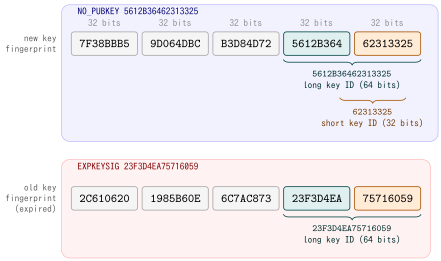
So NO_PUBKEY 5612B36462313325 and the fingerprint 7F38BBB59D064DBCB3D84D725612B36462313325 refer to the same key, and the same holds for the expired one.